Your cart is currently empty!
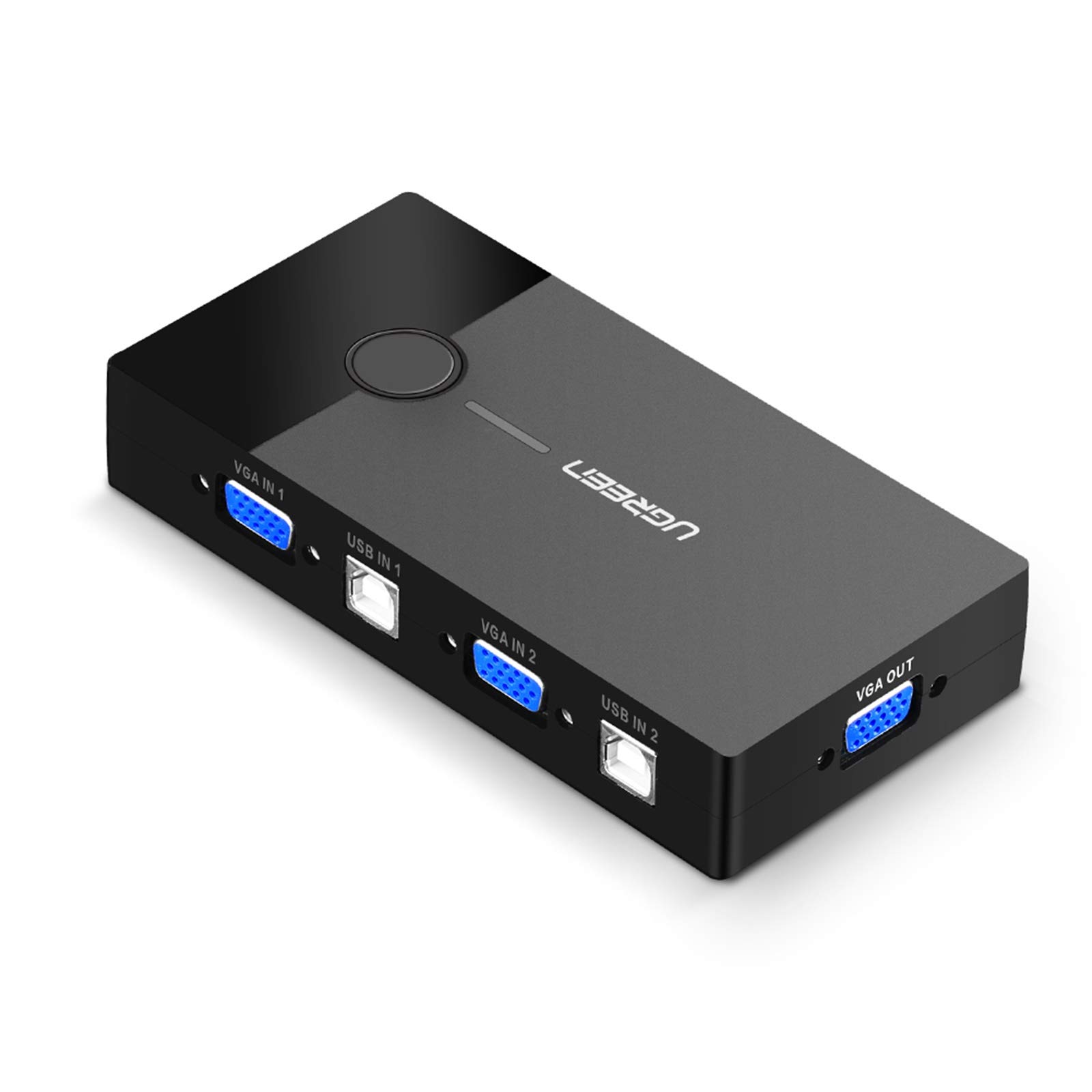
Ugreen 2 Port USB VGA KVM Switch Box Adapter Review for PCs and Laptops
₹1,819.00
? Transform your workspace with the Ugreen 2 Port 2-in-1 Out USB VGA Video Sharing KVM Switch Box! ? This sleek black adapter makes it a breeze to connect two computers to one monitor or projector, allowing you to effortlessly switch between devices with just a press of a button. ?➡️? Perfect for professionals and students alike, it optimizes your setup for productivity and convenience. Don’t miss out on the chance to streamline your tech experience – grab yours today! ?✨
Description
If you’re looking for a versatile solution to manage multiple computers with a single monitor, the Ugreen 2 Port 2-in-1 Out USB VGA Video Sharing KVM Switch Box Adapter is an excellent choice. This handy device allows you to switch between two PCs effortlessly, making it ideal for home offices, classrooms, or presentations. Let’s dive into a thorough review of this product to see if it fits your needs!
Table of Contents
Key Features at a Glance
- 2 Port KVM Switch for seamless switching between two PCs
- VGA video output for compatibility with various devices
- USB ports for keyboard and mouse connectivity
- Plug-and-play design for easy setup
- Compact and lightweight for portability
Unboxing & First Impressions
The Ugreen KVM switch comes neatly packaged, and upon opening, you find the switch box itself, a user manual, and the necessary cables. The first impression is quite positive; the device feels sturdy and well-constructed, suggesting it will withstand regular use. The user manual is clear and concise, making it easy to get started.
Design and Build Quality
Measuring a compact size, the Ugreen KVM switch is designed to minimize desk clutter. The black finish gives it a sleek, professional appearance. The buttons are located conveniently on the front for easy access when switching between PCs. Overall, the build quality is solid; it feels durable, and the connectors are well made, ensuring a stable connection.
Performance and Usability
In terms of performance, the Ugreen KVM switch excels. Switching between the two connected PCs is virtually instantaneous, with no noticeable lag or delay. The video output is crisp and clear, thanks to the VGA compatibility. Users have reported no issues with keyboard and mouse lag, making it an excellent choice for multitasking.
Feature Breakdown
Here are some of the standout features of the Ugreen KVM switch:
- Two Ports: Connect two different computers and switch between them without hassle.
- Video Sharing: Share a single monitor with both PCs in high resolution.
- USB Compatibility: Easily connect USB peripherals like keyboards and mice.
- Plug-and-Play: No software installation required; simply connect and use.
Detailed Specifications
| Specification | Details |
|---|---|
| Input Ports | 2 x VGA, 2 x USB |
| Output Ports | 1 x VGA, 1 x USB |
| Resolution Support | Up to 1920×1080 |
| Dimensions | Approximately 4.5 x 2.1 x 1.0 inches |
| Weight | 0.5 lbs |
| Power Supply | USB powered |
Pros and Cons
Pros
- Simple setup and operation
- Compact design saves desk space
- Reliable performance with minimal lag
- Cost-effective solution for dual PC setups
Cons
- Only supports VGA output, which may limit compatibility with modern devices
- USB 2.0 ports may not suffice for high-speed devices
Comparison with Competitors
Compared to other KVM switches in the market, the Ugreen model stands out due to its compact size and ease of use. While some competitors offer HDMI support and additional features, they often come at a higher price point. If your setup relies on VGA connections, the Ugreen KVM switch is an excellent choice without breaking the bank.
Target Audience
This KVM switch is best suited for individuals who need to manage multiple computers without the hassle of constantly switching cables. It’s ideal for:
- Home office workers
- IT professionals managing several devices
- Educators using multiple computers for presentations
- Gamers who want to switch between consoles
Value Proposition
The Ugreen KVM switch offers excellent value, providing a reliable and efficient way to manage two PCs with a single monitor. Its affordability combined with solid performance makes it a compelling choice for anyone seeking to simplify their workstation setup.
Final Verdict
Overall, the Ugreen 2 Port 2-in-1 Out USB VGA Video Sharing KVM Switch Box Adapter delivers on its promise of simplicity and efficiency. Its compact design, ease of use, and reliable performance make it an outstanding option for those who need to manage multiple computers. If you’re in the market for a KVM switch, this one is definitely worth considering!
FAQs
Q: Can I use this KVM switch with HDMI devices? A: No, this switch only supports VGA connections. You would need a different model for HDMI compatibility.
Q: Does it require an external power source? A: No, it is powered through USB, so you won’t need an extra power adapter.
Q: Is it compatible with both Windows and Mac? A: Yes, it works well with both Windows and Mac systems.
Q: Can I connect more than two computers? A: No, this model supports only two computers at a time.
Q: Is there a warranty on the product? A: Yes, Ugreen typically offers a warranty, but check the specific terms when purchasing.
In conclusion, the Ugreen 2 Port 2-in-1 Out USB VGA Video Sharing KVM Switch Box Adapter is a practical, cost-effective solution for those looking to streamline their workspace. Whether you are a professional managing multiple devices or someone who simply needs to connect two PCs to a single monitor, this KVM switch is a reliable and user-friendly choice that can enhance your productivity!
Related products
-
10Gtek 12G Internal Mini SAS SFF-8643 to U.2 SFF-8639 NVMe SSD Cable Review
₹4,889.00 -
7SEVEN HD Mini SAS Cable Review for Enhanced SATA Power Connectivity
-
7SEVEN Mini SAS 38Pin SFF-8654 to 4 SATA Cable Review for Efficient Data Transfer
-
7SEVEN® Mini-SAS Cable, SFF-8643 to SFF-8087, Internal Mini SAS to Mini SAS 36 Pin for RAID, PCIE Controller 1 Meter Cable Length 100cm
₹2,499.00 -
AC600 WiFi USB Dual Band Adapter with Bluetooth 5.0 for Fast Connectivity
Reviews
There are no reviews yet.