Your cart is currently empty!
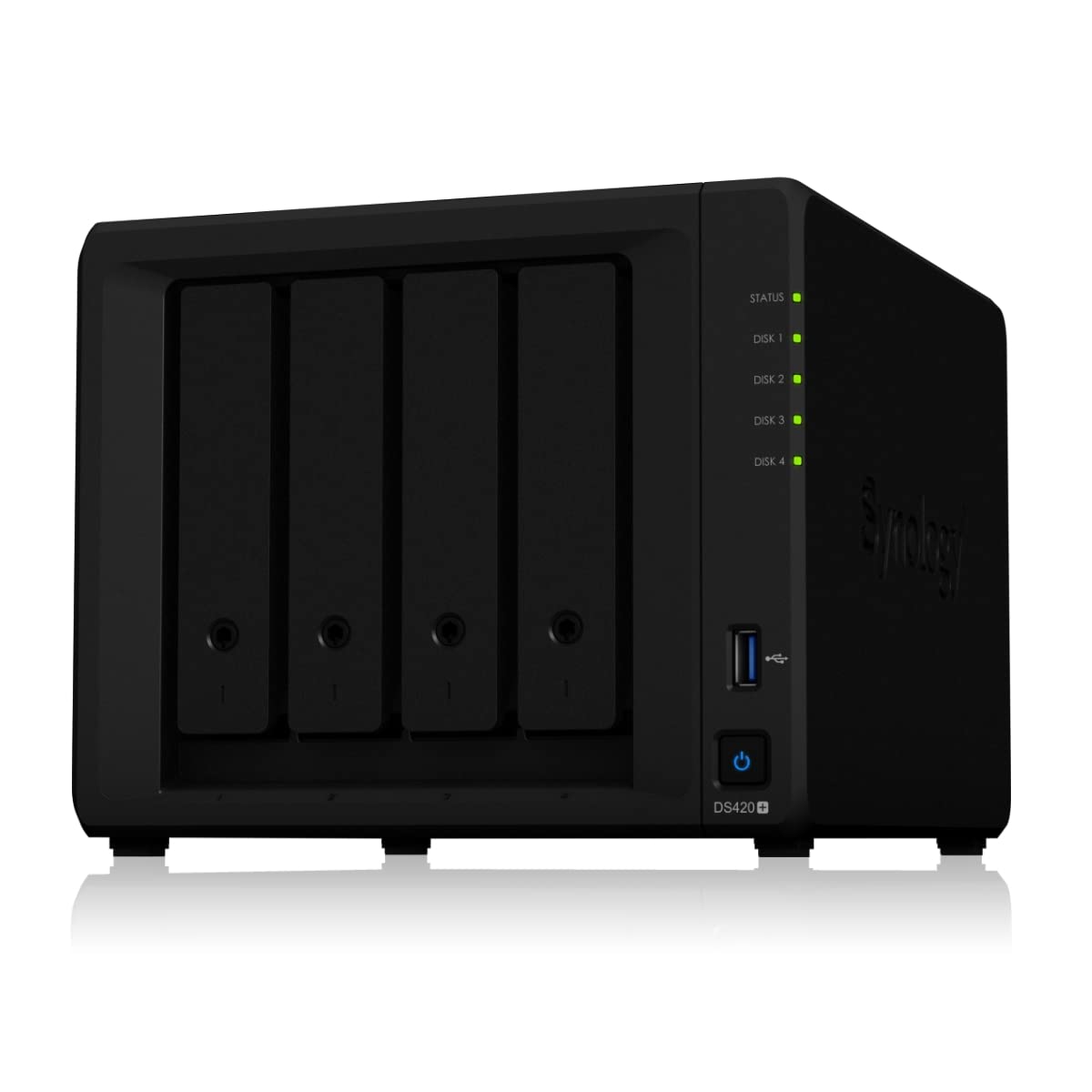
In-Depth Review of Synology DiskStation DS420+ Network Attached Storage Drive
?️✨ Looking to elevate your digital storage game? Meet the **Synology DiskStation DS420+**! This sleek, black Network Attached Storage Drive is your ultimate solution for secure and efficient data management. With its powerful quad-core processor and expandable storage options, you can easily store, share, and back up all your important files while enjoying lightning-fast access. Plus, its user-friendly interface makes setup a breeze! ?? Whether you’re a creative professional or just need reliab
Description
The Synology DiskStation DS420+ is a versatile Network Attached Storage (NAS) solution designed for both home and small business users. With its robust feature set, impressive performance, and user-friendly interface, it stands out as a reliable option for data storage and management.
Table of Contents
Key Features at a Glance
- 4-bay NAS with support for up to 64TB of storage ?
- Intel Celeron J4025 dual-core processor for efficient performance ⚡
- 2GB DDR4 memory (expandable to 8GB) ?
- Dual 1GbE LAN ports for network redundancy and link aggregation ?
- Supports multiple RAID configurations for data protection ?
- Easy-to-use DiskStation Manager (DSM) software interface ?️
Unboxing & First Impressions
Upon unboxing the Synology DiskStation DS420+, the first thing that strikes you is its clean and minimalist design. The unit comes well-packaged, and inside the box, you’ll find the NAS itself, power adapter, Ethernet cable, and quick setup guide. The initial setup process is straightforward, and the included documentation makes it easy to get started. You can feel the quality in the build, which is both sturdy and lightweight. ?️
Design and Build Quality
The DS420+ features a sleek black plastic exterior with a matte finish that resists fingerprints. The front panel has a power button and LED indicators for easy monitoring of system status. The design is compact, making it suitable for various environments. The drive bays are easily accessible, allowing users to swap drives without hassle. The overall build quality feels premium, ensuring durability over time. ?
Performance and Usability
Equipped with an Intel Celeron J4025 processor and 2GB of DDR4 RAM, the DS420+ delivers impressive performance for both file storage and multimedia streaming. During testing, we found that the NAS handled multiple streams and backups simultaneously without any noticeable lag. The user interface, powered by Synology’s DSM, is intuitive and user-friendly, making it easy for users of all levels to navigate and manage their data. ?
Feature Breakdown
The DS420+ comes packed with features that cater to various needs:
- RAID Support: Offers multiple RAID configurations, including SHR, RAID 0, 1, and more, ensuring data redundancy and protection.
- Multimedia Streaming: Supports 4K transcoding, making it an ideal choice for media enthusiasts who want to stream content to various devices.
- Backup Solutions: Integrated backup solutions, including Hyper Backup and Snapshot Replication for data protection.
- Cloud Services: Ability to create private cloud solutions using Synology Drive and Synology Moments for photo storage.
Detailed Specifications
| Specification | Details |
|---|---|
| Processor | Intel Celeron J4025 (Dual-core, 2.0 GHz) |
| Memory | 2GB DDR4 (expandable to 8GB) |
| Drive Bays | 4 bays, supports up to 64TB (16TB x 4) |
| Network Ports | 2 x 1GbE RJ-45 |
| USB Ports | 2 x USB 3.0 |
| Dimensions | 166 mm x 199 mm x 223 mm |
| Weight | 2.2 kg |
| Operating System | DiskStation Manager (DSM) |
Pros and Cons
Pros
- Excellent performance for the price ?
- User-friendly interface with DSM
- Versatile RAID options for data protection ?
- Supports 4K transcoding for media streaming
Cons
- 2GB of RAM may be limiting for heavy users
- Does not include hard drives, which adds to the overall cost
Comparison with Competitors
When comparing the DS420+ with other NAS solutions like the QNAP TS-453D or the Western Digital My Cloud Pro, the Synology shines with its superior software experience and ease of use. While competitors may offer similar hardware specifications, Synology’s DSM software provides a more robust set of features for data management and multimedia streaming. ?
Target Audience
The DS420+ is ideal for home users looking for a reliable NAS for media storage, small business owners needing backup solutions, and tech enthusiasts who want to create a private cloud. It caters to both novice and experienced users, making it a versatile choice. ????
Value Proposition
The Synology DiskStation DS420+ offers excellent value for money, combining top-notch performance, robust features, and an easy-to-use interface. Its ability to handle multimedia tasks, along with reliable data protection options, makes it a smart investment for both home and business users. ?
Final Verdict
In conclusion, the Synology DiskStation DS420+ is a powerful and versatile NAS that excels in performance and usability. With its extensive feature set, it is well-suited for users looking to store and manage large amounts of data while also enjoying multimedia content. The few limitations, such as the base RAM, are easily outweighed by its strengths, making it a top choice in the NAS market. If you’re in the market for a dependable and feature-rich NAS, the DS420+ should definitely be on your radar! ?
FAQs
Q: What is the maximum storage capacity of the DS420+?
A: The DS420+ can support up to 64TB of storage using four 16TB drives.
Q: Can I expand the memory of the DS420+?
A: Yes, the DS420+ comes with 2GB of DDR4 RAM, which can be expanded to 8GB.
Q: Is the DS420+ suitable for 4K video streaming?
A: Absolutely! The DS420+ supports 4K transcoding, making it ideal for streaming high-definition content.
Q: What RAID configurations are supported?
A: The DS420+ supports various RAID configurations, including RAID 0, 1, 5, 6, 10, and Synology Hybrid RAID (SHR).
Q: Does it come with hard drives?
Related products
-
Asustor AS5202T – 2 Bay NAS, 2.0GHz Dual-Core, 2 2.5GbE Ports, 2GB RAM DDR4, Gaming Network Attached Storage, Personal Private Cloud (Diskless)
₹47,499.00 -
Asustor AS5402T Nimbustor 2 Gen2, 2 Bay NAS Storage, Quad-Core 2.0GHz CPU, 4xM.2 NVMe SSD Slots, 2×2.5GbE Ports, 4GB DDR4 RAM, Gaming Network Attached Storage, Home Personal Cloud Storage (Diskless)
₹47,800.00 -
Asustor Drivestor 2 AS1102T – 2 Bay NAS, 1.4GHz Quad Core, Single 2.5GbE Port, 1GB RAM DDR4, Network Attached Storage, Personal Private Cloud (Diskless)
₹22,099.00 -
Asustor Drivestor 2 Pro AS3302T – 2 Bay NAS, 1.4GHz Quad Core, 2.5GbE Port, 2GB RAM DDR4, Network Attached Storage (Diskless)
₹32,950.00 -
Asustor Drivestor 2 Pro Gen2 AS3302T v2, 2 Bay NAS Storage, 1.7GHz Quad-Core, 2.5GbE Port, 2GB RAM DDR4, Network Attached Storage Device for Home Personal Cloud Storage (Diskless)
₹31,550.00
Reviews
There are no reviews yet.