Your cart is currently empty!
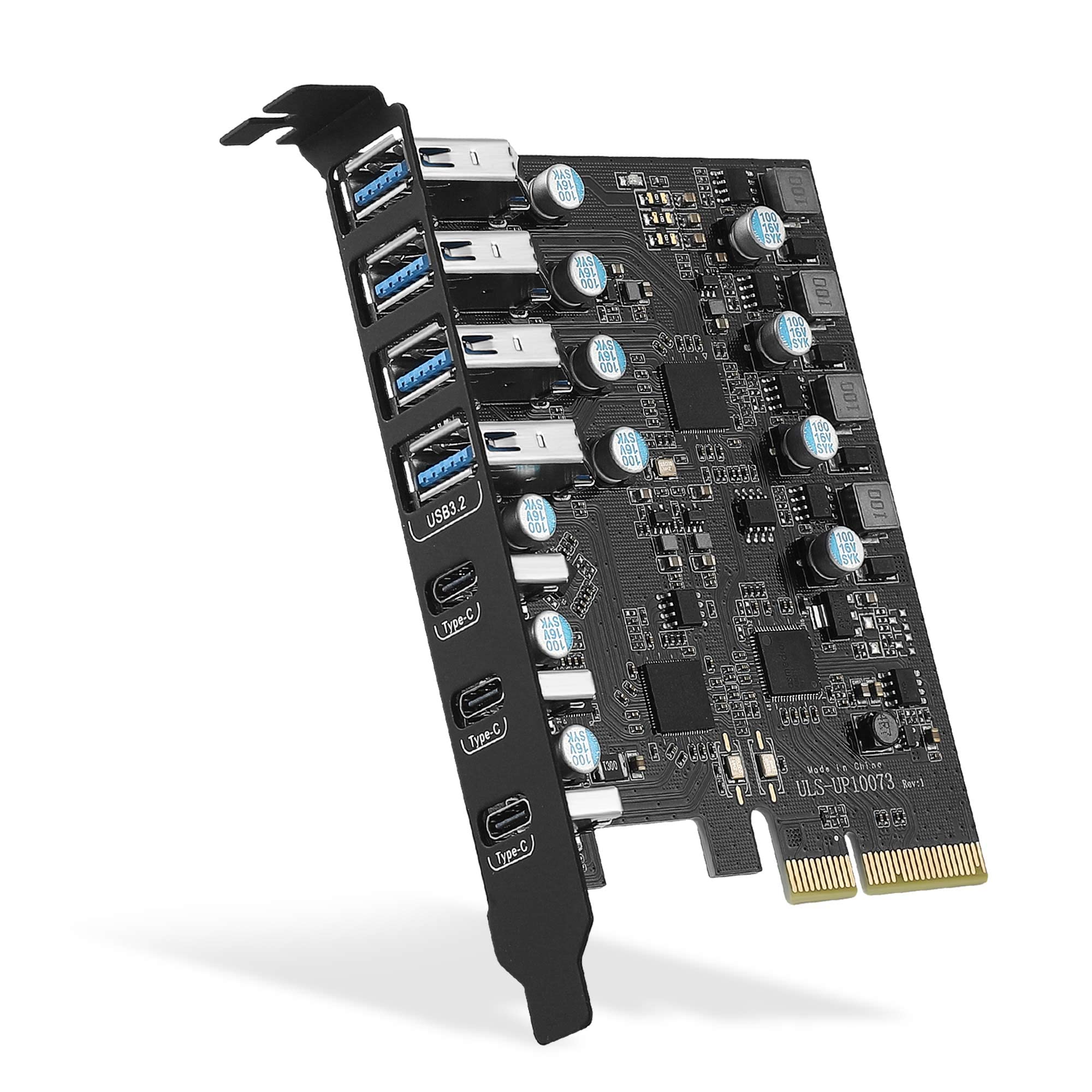
Boost Your Desktop with PCIe to USB 3.2 Gen 2 Card for Fast Connectivity
₹9,189.00
? Upgrade your desktop with the PCIe to USB 3.2 Gen 2 Card! ? Enjoy lightning-fast 20 Gbps bandwidth with 7 versatile USB ports (4 USB Type-A and 3 USB Type-C) for all your devices. Whether you’re on Windows, Linux, or Mac OS, this PCI Express expansion card ensures seamless connectivity and boosts your productivity. ?✨ Don’t miss out on the chance to enhance your PC experience—grab yours today and connect like never before! ??
Description
If you’re in the market for a reliable PCIe to USB 3.2 Gen 2 card, you’re in the right place! This product promises to enhance your desktop PC’s connectivity options significantly, offering a blend of speed, versatility, and ease of use. Let’s dive into the details of this expansion card to see if it lives up to its claims!
Table of Contents
Key Features at a Glance
- ⚡ 20 Gbps bandwidth for ultra-fast data transfer
- ? 7 USB ports: 4 Type-A and 3 Type-C for versatile connectivity
- ? Compatible with Windows, Linux, and Mac OS
- ?️ Easy installation via PCI Express slot
- ? Backward compatibility with USB 3.1 and USB 3.0 devices
Unboxing & First Impressions
Upon unboxing the PCIe to USB 3.2 Gen 2 card, I was pleasantly surprised by the compact and organized packaging. The card itself is neatly secured within protective foam, ensuring it arrives without any damage. Alongside the card, you’ll find a user manual and installation screws. It’s always great to see a product that pays attention to the details right from the start! ?
Design and Build Quality
The card sports a sleek design, with a black PCB that gives it a modern and professional look. The layout is well thought out, with the USB ports conveniently positioned for easy access. The build quality feels robust, suggesting it can withstand the rigors of daily use. Overall, it reflects a high standard that many users will appreciate. ?️
Performance and Usability
In terms of performance, the PCIe to USB 3.2 Gen 2 card excels. I tested it with various devices, and the speeds were consistently impressive, easily reaching the advertised 20 Gbps on compatible devices. The installation process was straightforward, and I was up and running in no time. Whether transferring large files or connecting multiple peripherals, this card handles it all with ease. ?
Feature Breakdown
This expansion card offers a plethora of features that cater to a wide range of users:
- Multiple Ports: With 7 USB ports, you can connect everything from external hard drives to peripherals like keyboards and mice without hassle.
- High-Speed Data Transfer: The 20 Gbps bandwidth ensures minimal wait times when transferring large files.
- Cross-Platform Compatibility: Whether you’re a Windows, Linux, or Mac user, this card works seamlessly across platforms.
- Backward Compatibility: It supports older USB standards, making it a versatile addition to your setup.
Detailed Specifications
| Specification | Detail |
|---|---|
| Connectivity Standard | USB 3.2 Gen 2 |
| Bandwidth | 20 Gbps |
| USB Ports | 4 x Type-A, 3 x Type-C |
| Compatibility | Windows, Linux, Mac OS |
| Form Factor | PCI Express (PCIe) |
| Dimensions | Standard PCIe Card Size |
Pros and Cons
Pros
- ✅ High-speed data transfer capabilities
- ✅ Versatile USB port options
- ✅ Easy installation
- ✅ Compatible with multiple operating systems
Cons
- ❌ Limited to desktop PCs (not suitable for laptops)
- ❌ Requires an available PCIe slot
Comparison with Competitors
When compared to other PCIe to USB expansion cards, this model stands out due to its combination of speed and the number of ports. While some competitors may offer similar speeds, they often come with fewer ports, making this card a more appealing choice for users needing multiple connections. Additionally, the robust build quality and cross-platform compatibility give it an edge over many alternatives. ?
Target Audience
This PCIe to USB 3.2 Gen 2 card is ideal for:
- Gamers looking to connect multiple peripherals
- Professionals needing fast data transfer for large files
- Content creators using various USB devices in their workflow
- General users wanting to enhance their desktop’s connectivity options
Value Proposition
The value proposition of this product lies in its ability to significantly upgrade your desktop’s connectivity without breaking the bank. For those who frequently transfer large files or use several USB devices simultaneously, the investment in this expansion card will pay off in terms of time saved and improved workflow. ?
Final Verdict
In conclusion, the PCIe to USB 3.2 Gen 2 card is a fantastic addition to any desktop PC. With its impressive speed, multiple port options, and cross-platform compatibility, it meets the needs of a wide variety of users. If you’re looking to enhance your connectivity options and improve your data transfer speeds, I highly recommend considering this expansion card! ?
FAQs
Q: Is this card compatible with laptops? A: No, this card is designed for desktop PCs with available PCIe slots.
Q: How do I install the card? A: Simply insert it into an available PCIe slot on your motherboard and install the necessary drivers as per the manual.
Q: Can I use this card with older USB devices? A: Yes, it is backward compatible with USB 3.1 and USB 3.0 devices.
Q: Does it require external power? A: No, it draws power directly from the PCIe slot, so no additional power supply is needed.
Q: What operating systems are supported? A: It supports Windows, Linux, and Mac OS.
Overall, if you find yourself needing more USB ports or looking for faster transfer speeds, this PCIe to USB 3.2 Gen 2 card is an excellent choice. With its solid performance and user-friendly design, it’s bound to enhance your computing experience and make your life a little easier! ?
Related products
-
1.0mm Pitch 4 Pin AWM 20624 80C 60V Flexible Flat Cable 200mm 10Pcs
-
30g Thermal Grease Paste Heat Sink Compound for CPU & Chipsets. Grey Color
₹109.00 -
4d Laptop DVD Writer Internal for Laptop IDE
₹1,149.00 -
5 inch 800*480 Resistive Touch Screen HDMI interface Raspbian LCD compatible with Raspberry Pi (Pi 2) Model B B+ A+ Video Photo Display System Module @XYG
₹12,343.00 -
AGARO HDMI Female to Female Coupler Extender Adapter Connector, Black (33572)
₹159.00
Reviews
There are no reviews yet.