Your cart is currently empty!
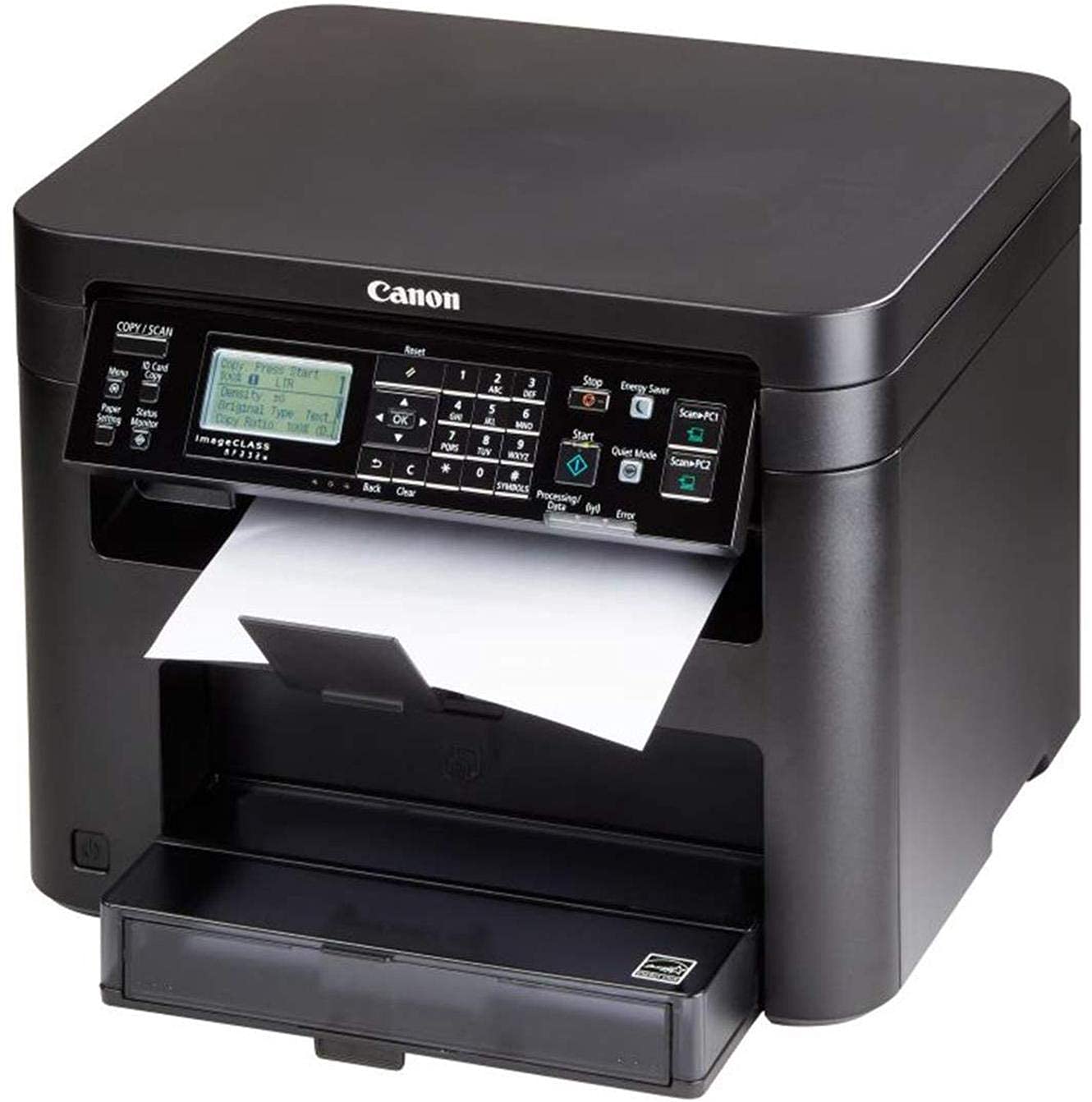
Canon imageCLASS MF232w Review – Efficient All-in-One Laser Printer
Canon imageCLASS MF232w Review The Canon imageCLASS MF232w is a versatile all-in-one laser printer that combines printing, scanning, and copying functionalities in a compact design. Offering wireless connectivity and high-quality monochrome printing, it targets both home and small office users looking for efficiency and performance at an affordable price. Let’s dive into the details! Table […]
Description
The Canon imageCLASS MF232w is a versatile all-in-one laser printer that combines printing, scanning, and copying functionalities in a compact design. Offering wireless connectivity and high-quality monochrome printing, it targets both home and small office users looking for efficiency and performance at an affordable price. Let’s dive into the details!
Table of Contents
Key Features at a Glance
- All-in-One functionality: Print, scan, and copy ?
- Wireless connectivity for easy mobile printing ?
- Fast printing speed of up to 23 pages per minute
- Compact design suitable for small spaces
- Energy-efficient with low power consumption
Unboxing & First Impressions
Upon opening the box, the Canon imageCLASS MF232w is neatly packed with all necessary accessories, including a starter toner cartridge, power cord, and user manual. The printer has a sleek and professional look, and its compact size makes it easy to fit into any workspace. The setup process is straightforward, and the initial impression is that this printer is built for efficiency and ease of use.
Design and Build Quality
The MF232w features a minimalist design that fits well in any office environment. Its black finish gives it a modern look, and the control panel is intuitively laid out, making navigation simple. The printer is sturdy and well-constructed, ensuring long-term durability. Its compact dimensions allow it to occupy minimal desk space, which is a significant plus for those with limited room.
Performance and Usability
The printing performance of the Canon imageCLASS MF232w is impressive, delivering crisp monochrome prints at a rapid pace of up to 23 pages per minute. The first print out time is quick, and the quality is consistent, making it a reliable choice for both documents and graphics. The wireless capabilities allow for convenient mobile printing from smartphones and tablets, further enhancing its usability. Scanning and copying functions are equally efficient, making it a true all-in-one solution.
Feature Breakdown
- Mobile Printing: Supports Apple AirPrint and Google Cloud Print, allowing for seamless mobile printing.
- Energy Saver Mode: Automatically reduces power consumption when not in use, saving energy and costs.
- High Yield Toner: Compatible with Canon’s high-yield toner cartridges for extended printing without frequent replacements.
Detailed Specifications
| Feature | Specification |
|---|---|
| Printer Type | Laser Monochrome |
| Print Speed | Up to 23 pages per minute |
| Print Resolution | 600 x 600 dpi |
| Connectivity | Wi-Fi, USB 2.0 |
| Monthly Duty Cycle | Up to 30,000 pages |
| Dimensions | 14.2 x 14.6 x 10.9 inches |
| Weight | 24.9 lbs |
Pros and Cons
Pros
- High-quality monochrome prints
- Fast printing speeds
- Compact design ideal for small spaces
- Wireless printing capabilities
- Energy-efficient operation
Cons
- Limited to monochrome printing only
- No automatic document feeder (ADF)
- Initial cost may be higher than basic inkjet printers
Comparison with Competitors
When compared to competitors like the Brother HL-L2350DW and HP LaserJet Pro M15w, the Canon imageCLASS MF232w holds its own with faster print speeds and better build quality. However, it lacks color printing capabilities, which may be a downside for users who need versatile printing options. The Brother model offers duplex printing, while the HP model is more compact but may not offer the same print speed.
Target Audience
The Canon imageCLASS MF232w is ideal for small business owners, remote workers, and students who primarily need monochrome printing. Its wireless capabilities make it a great choice for tech-savvy users who value convenience and efficiency in their printing tasks.
Value Proposition
For those looking for a reliable and efficient monochrome laser printer, the Canon imageCLASS MF232w offers excellent value. With its combination of performance, usability, and compact design, it caters to users who require high-quality printing without the added complexity of color printing.
Final Verdict
Overall, the Canon imageCLASS MF232w is a solid choice for anyone in need of a dependable monochrome all-in-one printer. With impressive print speeds, wireless connectivity, and a user-friendly design, it effectively meets the demands of home and small office environments. If you require a printer that delivers consistent performance and quality without unnecessary frills, the MF232w is definitely worth considering! ?
FAQs
Q: Is the Canon imageCLASS MF232w suitable for color printing?
A: No, this printer is a monochrome model, which means it only prints in black and white.
Q: Can I print from my smartphone?
A: Yes, it supports mobile printing capabilities through Apple AirPrint and Google Cloud Print.
Q: Does it come with a warranty?
A: Yes, Canon typically offers a limited warranty for this printer. Check the specific details with your purchase.
Q: What type of toner does it use?
A: The MF232w uses Canon’s standard and high-yield toner cartridges, which are available for purchase separately.
Q: Is it easy to set up?
A: Yes, the setup process is straightforward, and Canon provides clear instructions to guide you through it.
In summary, the Canon imageCLASS MF232w stands out for its reliable print quality, fast performance, and user-friendly features. If you prioritize efficiency and are looking for a dependable monochrome printer, this model is highly recommended. Consider your specific needs to ensure it aligns with your printing requirements! ?️
Related products
-
BANSAL Mini Pocket Printer, Gifts for Kids, Portable Thermal Printer for Pictures/Retro-Style Photos/Receipts/Notes/Lists/Label/Memo/QR Codes,Bluetooth Wireless Smart Printer
₹799.00 -
Brother DCP-B7500D Multi-Function Monochrome Laser Printer with Auto Duplex Printing (Toner Box Technology) (Grey)
-
Brother DCP-B7535DW Automatic Duplex Laser Printer with 34 PPM Print Speed, Multifunction (Print Scan Copy), Automatic Document Feeder, (WiFi, WiFi Direct, LAN & USB), Free Installation
-
Brother DCP-B7535DW Review: Fast Duplex Laser Printer for Office Needs
-
Brother DCP-L2520D Automatic Duplex Laser Printer with 30 Pages Per Minute Print Speed, Multifunction (Print Scan Copy), 2 in 1 (ID) Copy Button, LCD Display, 32 MB Memory, 250 Sheet Paper Tray, USB
₹17,399.00
Reviews
There are no reviews yet.