Your cart is currently empty!
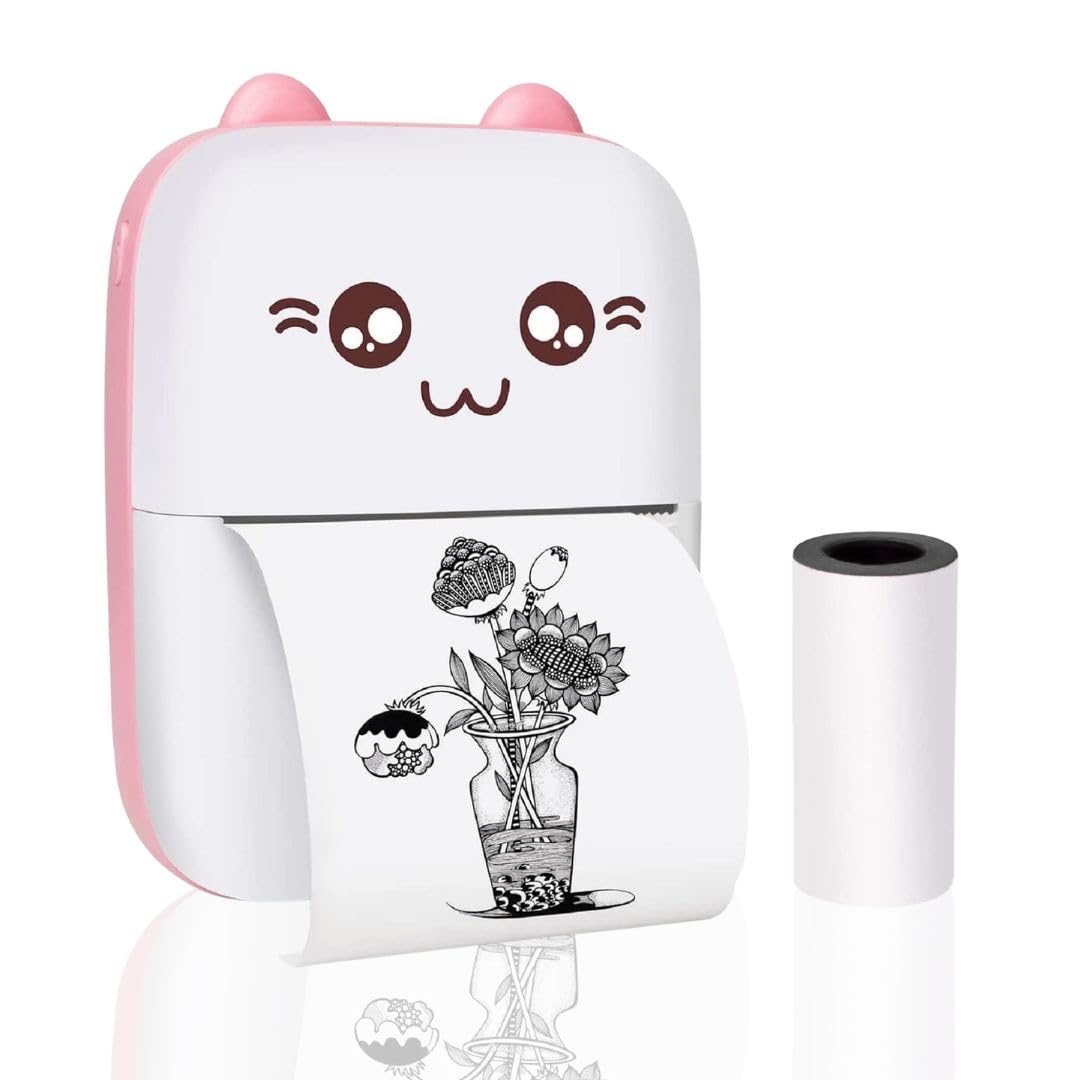
Aanha Mini Printer Review – Wireless Thermal Printer for Photos and Labels
₹850.00
📸✨ Meet the Aanha Mini Printer – your pocket-sized printing companion! This cute pink wireless Bluetooth printer lets you effortlessly print photos, labels, and memos straight from your smartphone 📱, whether you’re on Android or iOS. With thermal printing technology, there’s no need for ink – just pure convenience! 🖨ï¸ðŸ’– Its compact design makes it perfect for students and creatives on the go. Plus, the included USB cable ensures you can always stay charged. Transform your memories into tangible k
Description
The Aanha Mini Printer is a delightful gadget that combines convenience and functionality in a compact design. Perfect for students, professionals, and anyone who loves to capture memories on the go, this wireless Bluetooth thermal printer is a versatile addition to your tech arsenal.
Table of Contents
Key Features at a Glance
- 🌈 Wireless Bluetooth connectivity for seamless printing
- ðŸ–¼ï¸ Compact and lightweight design, perfect for portability
- 📱 Compatible with Android and iOS smartphones
- ðŸ–¨ï¸ Thermal printing technology for crisp, clear images and text
- 🔋 USB rechargeable for convenience
- 💖 Available in an adorable pink color
Unboxing & First Impressions
Upon receiving the Aanha Mini Printer, I was greeted with a sleek and colorful packaging that sets the tone for a fun unboxing experience. Inside, I found the printer itself, a USB charging cable, and a quick start guide. The first impression was positive, as everything seemed well-organized and presented. The printer felt sturdy in hand, and I was excited to test its features right away!
Design and Build Quality
The Aanha Mini Printer boasts a compact and stylish design, making it easy to carry in a bag or even a pocket. The pink color adds a fun touch, appealing to those who prefer a bit of flair in their gadgets. The build quality feels solid, with a smooth finish that enhances its aesthetic appeal. The buttons are intuitively placed, ensuring ease of use without any complications.
Performance and Usability
In terms of performance, the Aanha Mini Printer exceeded my expectations. Connecting it to my smartphone via Bluetooth was a breeze, and I was able to print photos in just a matter of seconds. The thermal printing technology produced vibrant and detailed images, making it perfect for both photos and labels. Usability-wise, the accompanying app is user-friendly, allowing for easy editing and customization of prints.
Feature Breakdown
Let’s delve into the standout features of the Aanha Mini Printer:
- 🔗 **Wireless Connectivity**: Print from your smartphone without the hassle of cables.
- 🎨 **Customizable Prints**: Edit and personalize photos before printing.
- 🌟 **Thermal Printing**: No need for ink, resulting in cost-effective, high-quality prints.
- 🔋 **Rechargeable Battery**: Long-lasting power for printing on the go.
- 👩â€ðŸŽ“ **Multi-Purpose Use**: Great for notes, labels, and cherished memories.
Detailed Specifications
| Feature | Description |
|---|---|
| Connectivity | Wireless Bluetooth |
| Print Technology | Thermal |
| Compatible Devices | Android, iOS |
| Battery | Rechargeable via USB |
| Color | Pink |
| Dimensions | Compact Size |
Pros and Cons
Pros
- Easy to use with smartphone connectivity.
- High-quality prints without ink.
- Compact and portable design.
- Affordable price point.
Cons
- Limited to thermal printing capabilities.
- May require specific paper types for optimal results.
Comparison with Competitors
When compared to other portable printers like the HP Sprocket and Canon Selphy, the Aanha Mini Printer stands out due to its affordability and ease of use. While competitors may offer additional features like built-in editing tools, the Aanha focuses on delivering quality prints without the complexity, making it an excellent choice for casual users.
Target Audience
This mini printer is ideal for:
- 📚 Students who want to print study materials or photos for projects.
- 🎉 Event planners needing portable printing solutions for labels and decor.
- 📸 Photography enthusiasts looking to print on-the-go.
- 👩â€ðŸŽ¨ Crafters who enjoy creating personalized items.
Value Proposition
The Aanha Mini Printer offers a fantastic blend of portability, ease of use, and affordability. Its thermal printing technology eliminates the need for costly ink replacements, making it a practical choice for anyone who frequently prints photos or labels.
Final Verdict
In conclusion, the Aanha Mini Printer is a charming and functional device that fulfills its promises of convenience and quality. Its wireless capabilities, compact design, and ease of use make it a valuable asset for anyone who loves to print on the go. Whether you’re a student, a busy professional, or a crafting enthusiast, this printer is worth considering!
FAQs
Q: Is the Aanha Mini Printer compatible with all smartphones?
A: It is compatible with most Android and iOS smartphones, but you should check your device’s specifications for compatibility.
Q: Can I print in color with this printer?
A: The Aanha Mini Printer uses thermal printing technology which typically prints in black and white, but some specialty papers allow for color prints.
Q: How long does the battery last?
A: The battery life can vary based on usage, but it is designed to last for multiple prints on a single charge.
Q: What type of paper does it use?
A: It uses thermal printing paper, which is often available in rolls or sheets specifically designed for thermal printers.
Q: Is it easy to set up and use?
A: Yes! The printer is user-friendly, and the setup process is straightforward with clear instructions in the manual.
Overall, the Aanha Mini Printer offers numerous benefits, including portability, ease of use, and vibrant prints that make it a great companion for everyday tasks. If you’re looking for a reliable and cute printing solution for your smartphone, this could be the perfect match for your needs! 🌟
Related products
-
BANSAL Mini Pocket Printer, Gifts for Kids, Portable Thermal Printer for Pictures/Retro-Style Photos/Receipts/Notes/Lists/Label/Memo/QR Codes,Bluetooth Wireless Smart Printer
₹799.00 -
Brother DCP-B7500D Multi-Function Monochrome Laser Printer with Auto Duplex Printing (Toner Box Technology) (Grey)
-
Brother DCP-B7535DW Automatic Duplex Laser Printer with 34 PPM Print Speed, Multifunction (Print Scan Copy), Automatic Document Feeder, (WiFi, WiFi Direct, LAN & USB), Free Installation
-
Brother DCP-B7535DW Review: Fast Duplex Laser Printer for Office Needs
-
Brother DCP-L2531DW Multi-Function Monochrome Laser Printer with Auto-Duplex Printing & Wi-Fi
Reviews
There are no reviews yet.